.

.

Saturday, May 14, 2011

Angry Birds Seasons: Happy Valentine’s Day! Update v1.2.0 Symbian^3 Signed - Free Game Symbian Download- Link MediaFire


Angry Birds Seasons: Happy Valentine ’s Day! As we all know, every season is an Angry Birds season. After Trick or Treat and Season’s Greetings, Angry Birds Seasons returns with yet another gift that keeps on giving: Hogs and Kisses for Valentine’s Day! Enjoy the Valentine’s Day spirit of love and affection by popping more pigs! Fling more passionate birds in an atmosphere of affectionate action! Find the loveliest Golden Egg of them all! 
Angry Birds Seasons version should be installed first, which is inside the download package

Click below to download
Angry Bird Valentine (Nokiavnn.com)(signed)

Angry Birds v1.4.2 Symbian^3 - Nokia N8, E7, C6-01, C7 ...- Free Game Symbian Download - Link MediaFire


Angry Birds for Symbian^3 (v1.2.1+v1.4.2) The survival of the Angry Birds is at stake. Dish out revenge on the green pigs who stole the Birds ’ eggs. Use the unique destructive powers of the Angry Birds to laywaste to the pigs’ fortified castles. Angry Birds features challenging physics-based castle demolition, and lots of replay value.
Each of the 105 levels requires logic, skill, and brute force to crush the enemy. Protect wildlife, or play Angry Bird!


Click below to download:
Angry Bird v1.4.3 (Nokiavnn.com)(signed)

AngryBird v1.2.1 Symbian^3 - Nokia N8, C7, C6-01 and E7 - Free Game Symbian Download - Link MediaFire


AngryBird v1.2.1 Symbian^3 - Nokia N8, C7, C6-01 and E7


Angry Birds for Symbian^3 (v1.2.1) The survival of the Angry Birds is at stake. Dish out revenge on the green pigs who stole the Birds ’ eggs. Use the unique destructive powers of the Angry Birds to lay waste to the pigs’ fortified castles. Angry Birds features challenging physics-based castle demolition, and lots of replay value. Each of the 105 levels requires logic, skill, and brute force to crush the enemy. Protect wildlife, or play Angry Birds!


Click below to download
Angry Bird 1.2.1(Nokiavnn.com) (signed)

Action Bowing (signed)

Action Bowing is the best and most feature packed bowling game on Ovi. It is the only bowling game that features:

• 12 outrageous bowling locations 
• 12 custom bowling balls 
• State-of-the-art 3D physics engine 
• 3 different ways to bowl 
• Pass and Play Mode 
• Practice mode 
• Bowling Trivia featuring 165 questions 
• Detail stats tracking 
• Bowling alley, bowling ball and pins built according to PBA regulation specifications 
• Stunning 3D graphics 
• Full music tracks and robust sound effects 


ACTION BOWLING (nokiavnn.com)(signed)

Tuesday, April 12, 2011

Nokia E6 Unveiled – QWERTY Keyboard, Gorilla Touch Screen, Symbian Anna and more!

Along with the latest Nokia X7-00 entertainment smartphone, Nokia also unveiled the its latest Symbian smartphone that is centered to cater business section, the Nokia E6-00. So let’s meet the E6 after the break!


Nokia E6-00 is your latest Symbian^3 device to have the portrait QWERTY. It’s a smartphone that is centered for business and it also offers both touchscreen and physical keys. It also packs heavy multimedia features like 8MP camera and wide support of apps and games from Ovi Store exclusively for your Symbian Anna or S^3 PR 2.0.


Nokia E6 Specs and Features:

  • 2.46″ AMOLED, Gorilla touchscreen

  • 115.5 x 59 x 10.5mm, 133g

  • QWERTY keyboard

  • Symbian Anna or S^3 PR 2.0

  • 8GB Storage and up to 32GB microSD support

  • 8MP FF Camera with DLED, HD video recording

  • Ovi Maps, USB OTG, Microsoft services integrations, dedicated chat and email clients for Eseries

  • 1500mAh battery

  • Price: €340 before taxes and subsidies

  • Available on Q2 and Q3 for N. America


More specs at Nokia.com/E6


Do you LOVE the Nokia E6?

Meet Symbian Anna, It Rocks!

Symbian Anna…We waited for you! and now you’re finally here.


Symbian Anna is the codename for Symbian^3 PR 2.0 and that’s a smart move for Nokia to approach better naming system for their software versions. Symbian Anna is available to the newly announced Nokia X7-00 and Nokia E6-00 smartphones that brings new experiences.


So what’s new with Symbian Anna?

  • Improved visual looks, from icons to widgets.

  • Much improved web browser, now faster and reliable

  • Improved typing system, now with portrait QWERTY keyboard

  • Improved services and apps like Ovi Maps

  • And more!


So when will Symbian Anna hit Nokia N8, E7, C7 and C6-01?
Nokia didn’t mentioned the exact date of the Symbian Anna update for these four devices but expect that it would hit later this Q2 of the year.


Will Symbian Anna hit the S60v5 devices too?
Sadly, No. S60v5 devices is very different from S^3 so you won’t see the same update. But of course don’t lose hope ‘coz Nokia is always the best when it comes to software updates. So I’m sure there will be tons of future treats to come for your Nokia.


Watch Symbian Anna on Nokia X7-00 below.


So excited for Symbian Anna?


Saturday, January 22, 2011

How To Upgrade Firmware Offline Or Flash Dead Phones Using Phoenix

Tools Required:
1.Phoenix Service 2010 suite:
Download here


2.Navifirm:
NaviFirm Plus 1.3
or NAVI FIRM EX V1.5


Before Flashing:


- backup your phone number and phone number of important personal information. If you want a clean installation, format your E: drive as well using the built in Nokia file manager .


Lets Start…….


->Run Phoenix Service Software installer.


>Start Installing Phoenix


-> Now (the boring part) run Navifirm (it takes an hour or more to download the whole patch)…


Note: the reason i don’t use the builtin image downloader because it downloads older versions, from my experience.


After the files downloaded, copy them to C:\Program Files\Nokia\Phoenix\Products\RM-XXX\ - use your product code


->Now Run Phoenix 2010


[if you have dead phone use Dead Phones Flash? To being able to tick dead phone flash delete the usb connection in phoenix. then make it go into "no connection". then open the rm-xxx. the dead usb flashing will now be enabled.]


->Turn on the phone (it will start in offline mode because there is no SIM card inside).
->Plug in the USB cable to both the phone and the computer.
->When prompted, select “PC Suite” from the menu list on the phone.
->Wait for *all* drivers to fully install themselves before proceeding. You will see the driver icon disappear when it is complete.


-> Now Choose File Then Manage Connection


->###### “New”


->###### USB, and then ###### Next


->It will then search your USB ports for the phone. When it finds it, hit Finish


->Once it has finished scanning, ###### apply, then ###### close.


->Next, select “Scan Product” from the File menu.


-> Once finished scanning, you can see your model of phone and other details at the bottom screen.


->From the Flashing menu, choose Firmware Update.


->Wait for Phoenix to continue talking to the phone. You will see some information scroll by in the firmware Update window.
->###### Browse


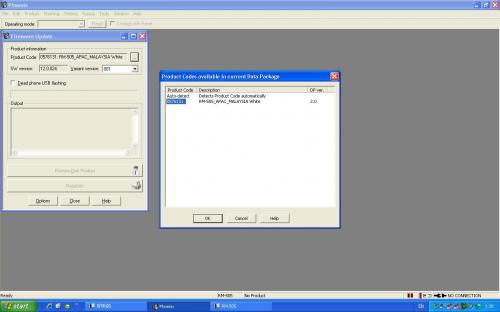
->See the product code section.U should find ur product code in that column.If u see “ur” product code,well and good.


-> but if u dont see ur code,or dont see anything for that matters,press on the “…” in the given prCode section.
You should see RMxxx-blabla, select that. Variant version =00. I will select “Refurbish” so that it will restore it to factory set (Clean and default C:).


->Press Start


Ignore the warning and click YES


The flashing process takes about five minutes to complete. The first few steps ensure connectivity to the phone.
After it verifies connectivity,Phoenix will automatically restart the phone.


Once it has completed (a dialog box will popup saying it has completed successfully), you may close Phoenix,
unplug the USB cable, and restart your phone. It should startup with the firmware you flashed to it.


For make it more clear , here is a video to chandarakk: