Symbian Anna…We waited for you! and now you’re finally here.
Symbian Anna is the codename for Symbian^3 PR 2.0 and that’s a smart move for Nokia to approach better naming system for their software versions. Symbian Anna is available to the newly announced Nokia X7-00 and Nokia E6-00 smartphones that brings new experiences.
So what’s new with Symbian Anna?- Improved visual looks, from icons to widgets.
- Much improved web browser, now faster and reliable
- Improved typing system, now with portrait QWERTY keyboard
- Improved services and apps like Ovi Maps
- And more!
So when will Symbian Anna hit Nokia N8, E7, C7 and C6-01?Nokia didn’t mentioned the exact date of the Symbian Anna update for these four devices but expect that it would hit later this Q2 of the year.
Will Symbian Anna hit the S60v5 devices too?Sadly, No. S60v5 devices is very different from S^3 so you won’t see the same update. But of course don’t lose hope ‘coz Nokia is always the best when it comes to software updates. So I’m sure there will be tons of future treats to come for your Nokia.
Watch Symbian Anna on Nokia X7-00 below.
So excited for Symbian Anna?
Tools Required:1.Phoenix Service 2010 suite:Download here
2.Navifirm:NaviFirm Plus 1.3or NAVI FIRM EX V1.5
Before Flashing:
- backup your phone number and phone number of important personal information. If you want a clean installation, format your E: drive as well using the built in Nokia file manager .
Lets Start…….
->Run Phoenix Service Software installer.
>Start Installing Phoenix
-> Now (the boring part) run Navifirm (it takes an hour or more to download the whole patch)…
Note: the reason i don’t use the builtin image downloader because it downloads older versions, from my experience.
After the files downloaded, copy them to C:\Program Files\Nokia\Phoenix\Products\RM-XXX\ - use your product code
->Now Run Phoenix 2010
[if you have dead phone use Dead Phones Flash? To being able to tick dead phone flash delete the usb connection in phoenix. then make it go into "no connection". then open the rm-xxx. the dead usb flashing will now be enabled.]
->Turn on the phone (it will start in offline mode because there is no SIM card inside).->Plug in the USB cable to both the phone and the computer.->When prompted, select “PC Suite” from the menu list on the phone.->Wait for *all* drivers to fully install themselves before proceeding. You will see the driver icon disappear when it is complete.
-> Now Choose File Then Manage Connection
->###### “New”
->###### USB, and then ###### Next
->It will then search your USB ports for the phone. When it finds it, hit Finish
->Once it has finished scanning, ###### apply, then ###### close.
->Next, select “Scan Product” from the File menu.
-> Once finished scanning, you can see your model of phone and other details at the bottom screen.
->From the Flashing menu, choose Firmware Update.
->Wait for Phoenix to continue talking to the phone. You will see some information scroll by in the firmware Update window.->###### Browse
->See the product code section.U should find ur product code in that column.If u see “ur” product code,well and good.
-> but if u dont see ur code,or dont see anything for that matters,press on the “…” in the given prCode section.You should see RMxxx-blabla, select that. Variant version =00. I will select “Refurbish” so that it will restore it to factory set (Clean and default C:).
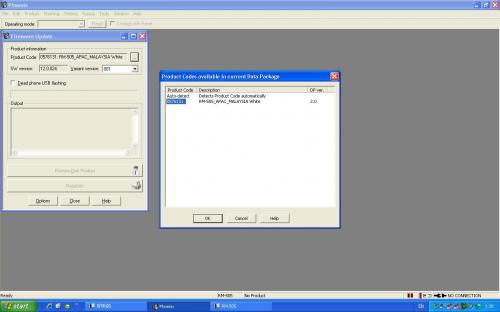
->Press Start
Ignore the warning and click YES
The flashing process takes about five minutes to complete. The first few steps ensure connectivity to the phone.After it verifies connectivity,Phoenix will automatically restart the phone.
Once it has completed (a dialog box will popup saying it has completed successfully), you may close Phoenix,unplug the USB cable, and restart your phone. It should startup with the firmware you flashed to it.
For make it more clear , here is a video to chandarakk:
If you thought that having the slide out 4-row QWERTY of Nokia E7 will make it abandon gaming pleasures then you’re wrong. Because Nokia E7 is also one the device that can smoothly run these action games. Symbian^3 have currently a wide game support, and we’ve seen it already on Nokia N8. Some of the few are Angry Birds, Sims, Hero of Spart, and Need For Speed. So check out the Need For Speed demo on the 4″ AMOLED capacitative touch screen with Nokia’s CBD technology, all packed in one gaming weapon, Nokia E7.
Demo on Nokia N8 are the new Gameloft games, some are in enhanced 3D support that is coming in future along with Symbian^3 devices of Nokia. Most of them are new with cool graphics and effects that you’ve been wanting since the N-Gage era. You could also check the previous games announced like the Angry Birds, Need for Speed Shift, Rally Master and Bounce, Monopoly, Tetris, and Sims 3.
Here’s the latest demo collection of Symbian^3 games that would definitely play on your upcoming Nokia N8, Nokia E7, and Nokia C7 and C6-01.
Hero Of Sparta for Symbian^3 – So far one of my favourite aside from Need For Speed and Angry Birds
GT Racing Academy for Symbian^3 – developed by Gameloft
Real Golf 2011
Guitar Rock Tour on Symbian^3
Real Football from Gameloft
You can soon download Symbian^3 games on Ovi Store when it will be available.
via: Dailymobile
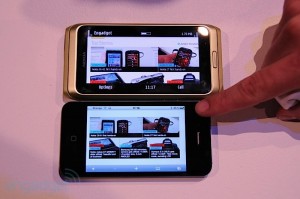
The engadget guys have managed to put a comparison on Apple’s iPhone 4 Retina display against on the new CBD (ClearBlack Display) technology of Nokia. As we all know, these two new technological terms had just appeared this year, but what we don’t know if these technologies are really a worth to consider as a breakthrough. Let’s see on the comparison.
Few months back when Apple introduced the iPhone 4, they also highlighted its one feature, the Retina Display as one of the breakthrough that iPhone 4 have giving it a better viewing output from the screen. Whilst today, Nokia also delivered the CBD technology to their new Symbian^3 devices, Nokia E7, Nokia C7 and C6-01. What they managed to innovate from the previous works they have is the layering of a blacker screen background and by repositioning the screens, and last is the combining to AMOLED. As Nokia said, CBD provides less power consumption and resulting to a better viewing experience for users.
Nonetheless, we should see the comparison to know if how do they differ and which you consider a better viewing experience. So can you spot the difference?Via Engadget.com
It’s no doubt that the Apple iPhone 4 is one of the best gaming device out there. But what we have now is the Nokia N8 that is a top-notch cameraphone and somehow could par the iPhone 4 in gaming capabilities. The proofs were the different enhanced 3D games demoed not only on Nokia N8, but as well to other Symbian^3 devices like Nokia E7, C7 and C6-01.Check out the Need for Speed on Nokia E7Check out Hero of Sparta, Guitar Rock Tour and more on Nokia N8So let’s see if how these two devices play the game GT Racing.
Via Dailyphoneblog
The Nokia N8 is the first Symbian^3 device of Nokia to enter the market this year. It’s a high-end device offering wide range of multimedia features yet an affordable smartphone over its offered features. It has the 12 MP camera loaded with Carl Zeiss optics and Xenon Flash, and it can record videos in HD (72op @ 25fps). The N8 includes the biggest camera sensor in the whole mobile industry and against the other compact cameras.
On the other hand, the iPhone 4 is a smartphone with 5 MP camera and LED flash whilst it records in HD @30fps. The thing that Apple should be proud of iPhone 4′s camera is the BSI or the back-illuminated sensor.
The thing is, these devices have different pixel count, aspect ratio, and type of sensor, but by looking to the results of the Endgadget comparison we would tell which is better. See the photos below.
ConclusionBy looking to these few sample shots we would see that the iPhone 4 shots are over saturated compare to Nokia N8. You would notice the over saturation especially on the 3rd photo sample. Whilst the Nokia N8 shots are natural and really reflects on what are the real subjects.
Nonetheless, it’s my personal assessment on the comparison, but you’re personal say is always welcome.
Images credit to Engadget.com